Showing posts with label InfoSec. Show all posts

Tuesday, December 8, 2015

Justification for Your Paranoia

So [again, So seems to be my favorite word for starting posts], it's been a long while since I've posted one of these...life has been complicated, I might get into details in a future unrelated post. Even when not posting these, I am constantly reading and constantly setting aside potential material for these updates. Rather than bog you down with ALL of the security nonsense from the last few months, I've thrown out a pile and jumped to the last couple of weeks section. Here is a pile of recent weird stuff from the world of information security... Enjoy!

1) VTech
Several years ago, my wife and I both worked in the "Edutainment" industry, making supposedly educational computer software. As people who used to get paid to do research into the efficacy of such things, we made a strong commitment to never expose our children to such scams (and really, almost all educational software is a scam). Discussions of efficacy aside, during Thanksgiving week of this year, the world learned another big reason not to put their trust in educational software and gadgets: they have just as little security as everything else out there...
While not on the scale of many previous breaches (not that 6 million users is small, but relative to hundreds of millions, it certainly is), the breach of educational toy maker VTech made headline news for a much different reason: the breached users were children and families. Also, the information obtained was not just usernames and passwords. The hacker who pulled this one got the names, addresses, and photographs of children, along with logs of chats between parents and children, and even audio samples and recordings of the kids voices.  
Analysis of the VTech breach done by various groups has turned up the typical issues: SQL Errors, lack of data retention boundaries, bad or missing encryption, passwords stored as a simple MD5 hash (i.e. not encrypted at all), etc. etc. etc.  Troy Hunt's analysis on Arstechnica goes into a lot of useful detail about how horrendous VTech's security really was. If these problems were isolated, you might be fine, but these are problems industry wide. And I don't mean just edutainment. All tech companies (including the ones I work for) have these problems. Also, kids are not just getting their hands on kid-specific products like VTech (how many of you have handed your kid an iPad to distract them for a bit). 
Since the hack, every site and news source from ABCNews, to NPR, to Sophos (the antivirus vendor) have made recommendations about how parents should respond or 'how to keep your kids safe' or the like. Let me make it very simple for you as someone with expertise in both educational gadgets and security, who is also a parent...
Just Don't.
Don't buy them. Don't use them.
Give your kids a book. You can't hack a book. And they'll learn so much more...
The one redeeming grace in this story is that the hacker was a relatively ethical one. In an interview with Motherboard (who originally broke the story), said hacker revealed the existence of forums broadly dedicated to hacking the VTech Innotab tablet ("for the lulz"). So far as is known, the hacker has not sold or otherwise profited from the data dumps and claims that,"I just want issues made aware of and fixed."

2) Fun Android Games...
No, not the kind where you click and launch birds, the kind where you easily spoof your email name and address and Google doesn't do anything about it. Thanks to the very slow turnaround and release cycle of fixing Android bugs (and the nature response to the researchers bug report), this is something you can try from home very easily and probably will be able to do for a fairly long time.

If you are using GMail and want to mess with your friends who have Android devices, just click on the gear icon in the top right of gmail. Select "Settings" then "Accounts and Import". Scroll down to "Send Mail As" and click "edit info" on the far right. Input the name you want displayed followed by a quotation mark, then the email address you want to display in quotes (Security Guy ""security@security.com"). Note the double quotes between the name and the address, that's the part that triggers the bug.
The next time you send an email to an Android users, they will see only the Name and email address you entered and your actual information will be completely obscured (even if the user clicks 'show details').
Have fun phishing!
Note: If they open the email on anything other than an Android device, they will be able to see your actual sender information. Until this is fixed, you probably want to check your gmail using a browser rather than your phone. 

3) Keep your phone in the other room when watching TV...
High-frequency sounds are being used to track people's behavior across multiple devices (TVs, tablets, phones, and computers). The ultrasonic pitches are embedded into TV commercials or internet ads. While the sound can't be heard by the human ear, nearby tablets and smartphones can detect it. When they do, browser cookies can now pair a single user to multiple devices and keep track of what TV commercials the person sees, how long the person watches the ads, and whether the person acts on the ads by doing a Web search or buying a product. 
A letter to the FTC from the Center for Democracy and Technology detailed that this ultrasonic cross-device tracking is already being used by more than a dozen marketing companies. The use of ultrasonics also has some similarity to "badBIOS", a piece of theoretical malware that uses ultrasonic transmissions to jump between airgapped (non-networked) computers.
On the plus side, it looks like the FTC is working on the issue. On Nev 16th, they hosted a Cross-Device Tracking Workshop to discuss both the benefits and the privacy and security concerns associated with this technology. Of course, it could be years before any regulations or software or hardware mitigations are made to curb this activity.
For now, just remember to stash your phone in a sound-proof drawer when you want to watch something in private...

4) Yahoo! wants its money...
...and will hold your emails ransom to get it.
If you are like me (which I never really presume, but you're reading this so we must have something in common) you probably have several free email addresses (for whatever reason). Between the various big-name options (Google, Yahoo, Hotmail, etc.), Yahoo mail has long been popular with many privacy-minded folks who don't want all of their info being shared with Google (who are pretty open about using the content of your emails to drive targeted advertisements). Of course, Yahoo! also gets its money from adds (if slightly less targeted). Well, now Yahoo! is trying to make sure they recoup that revenue one way or another, and they'll stop you from reading your mail to get it.
Yahoo has acknowledged that it is testing a "product experience" that prevents some users from viewing their email messages. The problem can be fixed if those users turn off their ad blockers. Some users reported receiving pop-up messages asking them to disable their ad blockers before being permitted to view the contents of their inbox. If you are using Yahoo e-mail and you didn't pay for it, you are the product... if you want privacy, or if you don't like ads, you need to pay for it (or so say the folks at Yahoo). 
Of course, in many cases ad blockers are being used to prevent malicious adverts infecting the user's computer. In 2014, Yahoo admitted that adverts on its homepage had been infected with and serving malware for several days before they addressed the issue.
In the real world the cost of a retailer to attract customers to their store is to ensure the customers will be safe in that store and not robbed or molested by criminals. Likewise website owners and advertising network companies need to review how they can guarantee the privacy and security of their customers to their websites. It's high time that sites that depend on ad revenue realize that ad-blocking isn't just an "experience" issue for consumers - it's a security issue.

Sunday, August 2, 2015

Justification for Your Paranoia

Heading to Black Hat and DEF CON at stupid-o-clock in the morning tomorrow, and trying to stay awake, so it seems like a perfect time to chatter about the latest round of crazy ways that your are insecure...hopefully I will return from this outing with even more things to share...


From the series Nests by Jakub Geltner.
1) Stealing Data with Radios...
In a paper scheduled to be presented at the 2015 Workshop on Cryptographic Hardware and Embedded Systems, researchers from Tel Aviv university (who previously showed that you could steal encryption keys by touch), demonstrate "the extraction of secret decryption keys from laptop computers, by non-intrusively measuring electromagnetic emanations for a few seconds from a distance of 50 cm."
The attack can be executed using cheap and readily-available equipment: a consumer-grade radio receiver or a Software Defined Radio USB dongle. The setup is compact, can operate untethered, and can be easily concealed (they use the example of hiding it inside a piece of pita-bread). Common laptops, and popular implementations of RSA and ElGamal encryptions, are vulnerable to this attack, including those that implement the decryption using modern exponentiation algorithms such as sliding-window, or even its side-channel resistant variant, fixed-window exponentiation.
Obviously the two big questions are "What information gets leaked?" and "Why does this work?"
As to the first, they claim that: "In almost all machines, it is possible to tell, with sub-millisecond precision, whether the computer is idle or performing operations. On many machines, it is moreover possible to distinguish different patterns of CPU operations and different programs. ... we can, on some machines: distinguish between the spectral signatures of different RSA secret keys (signing or decryption), and fully extract decryption keys, by measuring the laptop's electromagnetic emanations during decryption of a chosen ciphertext."
To the second they claim: "Different CPU operations have different power requirements. As different computations are performed during the decryption process, different electrical loads are placed on the voltage regulator that provides the processor with power. The regulator reacts to these varying loads, inadvertently producing electromagnetic radiation that propagates away from the laptop and can be picked up by a nearby observer."
So yeah, they don't even need access to the actual data on your machine to steal the keys to your kingdom, just the EM radiation given off by your CPU running hot, and a small, cheap, easily concealed radio receiver...


2) More on the "Right" to Encrypt...
In my previous post, I mentioned how the United Nations special rapportuer on human rights recently suggested that the encryption of data and communications should be considered a basic human right. This is, however, not a new or original idea. I recently stumbled upon an article from the Fall 1997 issue of the Virginia Journal of Law and Technolofy titled The Use of Encrypted, Coded and Secret Communications is an "Ancient Liberty" Protected by the United States Constitution (it's a law journal article, of course it has a long title). The article attempts:
"to demonstrate that, from the early years of the American Republic, Americans have enjoyed a robust, free, and frequent use of codes, ciphers, and other forms of secret communication. [and ...] that Americans have long used secret modes of communication for numerous purposes, including political dissent, preservation of personal privacy in intimate matters, commerce, and criminal enterprises.
Similarly to the UN's special rapporteur, the article makes its arguments largely from the 1st-Amendment freedom of expression angle, specifically focusing on historical precedent. An interesting (US-specific) argument that I've yet to see made centers on the fact that the U.S. government lists (and regulates) encryption as a form of munitions. So there is room yet for a 2nd-Amendment argument that the use of encryption by U.S. citizens falls under the right to bear arms (there is a paper I'd love to see).
The conclusion includes a nicely hopeful tone:
"The federal government has, for only two generations, enjoyed the ability to quickly override consumer use of cryptography through powerful decryption technology. The government's superior decryption capacity is threatened (or perhaps it has practically evaporated) when average citizens can and do encrypt their communications and their records using powerful encryption products..."
i.e. Encrypt all the things!


3) Old-School Data Security...
This one is a bit of an overlap between my two biggest interests: information security and medieval fantasy. A post has been circulating in both of these circles from Medieval Books, a blog about, of course, medieval manuscripts, specifically related to the measures taken to protect books from theft. Chains, Chests, and Curses covers just that, the three most popular means of prevention of data loss in the medieval age...
It is a wonderful read and I strongly recommend it.
It also got me thinking about modern security. The first two, chains and chests, have some very obvious modern strategy equivalents: preventing data exfiltration and preventing access respectively. The third might have a more interesting corollary. Could we make the data "cursed"? Embed malicious software in the data somehow, so that if it is stolen it will do horrible things to the thief's machine (but somehow not harm the machine originally hosting said data)?  

4) More cars...
To anyone who has paid attention to this blog in the past, the Fiat/Chrysler recall should come as not surprise. If your car is connected it can be hacked. In fact, this news is so un-news-worthy that this is all I'm going to say about it, nor will I bother with links, since the entirety of mainstream media has seen fit to lay out the details of something so easily forseen...
On the plus side, I may have finally thought of my brilliant entrepreneurial scheme...an auto-shop that disables or lays encryption over vehicular communication systems...

Thursday, June 18, 2015

Justification for Your Paranoia

May was a dead month for me writing things, and June is not looking much better so far. I'm not feeling particularly inspired, but, after beating my head against a wall for four days on a problem with my vulnerability scanner at work, I need a break. So I might as well use it to indulge in the less professional side of my paranoia...

1) LastPass
I mentioned months ago that password managers were rife with vulnerabilities, even going so far as to say "Don't use LastPass for anything". Well, I hate to be proven right, but I was...
Monday, LastPass announced "suspicious activity" which included compromises of account email addresses, password reminders, salts, and authentication hashes (i.e. hashed passwords). The good part, the vaults themselves were not compromised...yet.
Attackers having those authentication hashes (and the other key bits of information mentioned) means that it is really only a matter of time before they decrypt the hashes, at which time they can easily get in to your account and get ALL OF YOUR PASSWORDS.
The good news: LastPass master passwords are salted, hashed, and stretched...which should significantly slow down someone trying to decrypt the passwords. But it doesn't mean that they cannot be decrypted, especially if the original password is weak. Rememebr, a high-end GPU can make as many as 10,000 guesses per second.
What should you do: go change your LastPass password, which makes that hash that was stolen useless. 
...
Also, to be fair to the people at LastPass, they are trying really hard to do things right, and did pretty well with this one. 
  • They quickly identified, contained, and evaluated the scope of the breach
  • They promptly notified users about the breach (within 72 hours)
  • They are certainly doing proper password hashing (100,000+ rounds of PBKDF2-HMAC-SHA256 hashing and stretching is no joke)
  • Vault data obviously isn’t stored on the same system as authentication data, evidence of good segmentation 


2) Encryption as a Human Right
Back in 2011, the UN declared internet access to be a human right, the latest report by UN special rapporteur David Kaye takes that a step further. The report states that:
"Encryption and anonymity, and the security concepts behind them, provide the privacy and security necessary for the exercise of the right to freedom of opinion and expression in the digital age. Such security may be essential for the exercise of other rights, including economic rights, privacy, due process, freedom of peaceful assembly and association, and the right to life and bodily integrity."
Kaye also includes appropriate calls to action:
"The Special Rapporteur, recognizing that the value of encryption and anonymity tools depends on their widespread adoption, encourages States, civil society organizations and corporations to engage in a campaign to bring encryption by design and default to users around the world and, where necessary, to ensure that users at risk be provided the tools to exercise their right to freedom of opinion and expression securely.
The report doesn't take quite as hard a line against encryption back doors as some of the big tech companies did recently, but it is nice to hear this coming from someone (anyone) in an official position. In the US, the fourth amendment protects citizens and their property from unreasonable and unwarranted searches, in the digital age, strong encryption is the one and only way to enforce that right to privacy.

3) Astoria
If encryption and anonymity are a human right, then we need better tools for such, eh?
Enter "Astoria".
Researchers in Israel and the US have developed a new Tor client aimed at thwarting the kind of traffic analysis and timing attacks used by intelligence agencies to de-anonymize of the Tor network. Dubbed Astoria, the tool's relay-selection algorithm decimates the percentage of vulnerable Tor connections from 58 percent of users to just 5.8 percent of users.
Tor Astoria uses an algorithm which is designed to more accurately predict attacks and then accordingly chooses the best and secure route to make a connection that mitigate timing attack opportunities.
"In addition to providing high-levels of security against [timing] attacks, Astoria also has performance that is within a reasonable distance from the current available Tor client," the researchers wrote. "Unlike other AS-aware [autonomous system aware] Tor clients, Astoria also considers how circuits should be built in the worst case, when no safe relays are available. Further, Astoria is a good network citizen and works to ensure that all the circuits created by it are load-balanced across the volunteer-driven Tor network."
 You can read the complete research paper here.
 The source-code for the Astoria client can be obtained from: Stony Brook University.

4) Because you've always wanted to do this, right?

I've talked previously about both cars being hackable to the point that one could control the braking and acceleration remotely. Well, now someone is working on making that flaw into a feature! Jaguar/Land Rover R&D have developed a prototype phone app that allows a driver to control their car remotely: start the car, steer, throttle (sadly to a maximum of only 4mph), and brake. Also, it apparently only works to a range of about 10 meters...
Of course...having made this kind of communication so deliberately possible, it is only a matter of time before someone figures out how to hack it and take complete control of your car from the comfort of their own living room...

Tuesday, June 2, 2015

Justification for Your Paranoia

It has been a good two months since I've posted one of these and a fair amount of interesting stuff has come out of the information security world. If you are at all involved in IT, then you've most likely heard about the LogJam (TLS) and Venom (VM) flaws that came out in May, so we'll not bother with those (if not, check the links and be ready to update your stuff). Instead, as usual, lets talk about some of the weirder (or more snarkable) things.


But first a shout out to the fine men and women of the United States Senate. 
(temporarily at least)


In case you didn't hear, Sunday night three major provisions of the Patriot Act, used to justify the NSA's bulk collection of phone records, were allowed to expire, thanks to the wonderful inaction of the U.S. Senate. This comes just a few weeks after the U.S. Second Circuit Court of Appeals ruled that same bulk data collection program to be illegal

Of course, the fight is not over. Not by a long shot. The Senate just had a procedural vote to consider the USA Freedom Act, which already passed the House. This bill does nothing to actually end that bulk collection, just passes it off to private telecoms to mass collect your data. As someone who works for a telecom and has tools for munging that data let me say, YOU DO NOT WANT IT IN MY HANDS (or any other private entity). That data needs to just die.

Thus, if you are not already, it is time to Blackout Congress. Some 15000 sites are already blocking and re-directing anyone from a congressional IP address to the protest page. Get on it. 


That said, now on to your regularly scheduled paranoia fuel...

1) Malware that cleans up after itself...
The malware arms race has been going on for decades as new malware comes out and security analysts try to reverse engineer it to learn what it is doing, how it does it, and how to stop it. Defensive cyber security folks have always been one step behind the attackers, but the latest models of malware are making this much, much worse.
The spyware known as Rombertik goes to great lengths to evade analysis. Rombertik employs a number of methods to prevent researchers from examining its workings, including a "self-destruct mechanism". Rombertik (a variant of an older trojan known as Carbon Grabber) spreads through spam and phishing emails and is designed to harvest all plain text entered in the browsers on Windows systems (note that even if the connection is secure, you are probably entering your credit card number and CCV into the form as plain-text).
It is common for malware to contain anti-debug, anti-virtualization, and anti-analysis features, but this one is different. If someone tries to tamper with it, Rombertik attempts to overwrite the device’s MBR and encrypt files. Effectively wiping the hard-drive to remove all traces of itself. Yep, that's right, if you try to investigate this malware, it just destroys your machine (which may or may not be worse than getting hacked, if you don't have a handy backup).
The real tricky part here, though, is that some researchers believe that the self-destruct is not targeted at security researchers, but at the people using the malware. The feature may actually be a trap for those who might try to use and modify the malware without authorization. When cybercriminals purchase Rombertik from its creator, they get a copy that communicates only with their command and control server. The address of the C&C is embedded in the binary code. Some cheapskate cybercrooks might try to hack the binary and change the address of the C&C server so that they can use the malware without having to pay for it. To prevent unauthorized use, the developers ensured that the destructive protection mechanism is triggered when such attempts are discovered.
Let this be a warning to ye then. If ye be a frugal criminal, write your own damn virus. 

2) Smart Billboards...
So Russia has banned the import of foods from the European Union and the US. This is not really a problem for shop-owners, as getting a few salami past customs is a time-honored tradition around the world, but how do you advertise your contraband?
Simple, pay an ad company to rig billboards with facial recognition that's been tweaked to spot the official symbols and logos on the uniforms worn by Russian police. As police approached the ad (see video below) the billboard would switch from advertising a nice, fat wedge of imported cheese, rolling over instead to an ad for a nice, completely non-contraband Matryoshka doll shop.
An ad that hides itself from the law is a clever stunt, albeit not too effective, as the police in the video had time to spot the ad for imported food before it scurried behind Matryoshka dolls. But what's more interesting than the effectiveness of this particular ad is the idea that billboards can use facial recognition to this degree to tailor offerings.
Besides the creepy factor of being photographed without your permission or knowledge, there's also the risk that comes with facial recognition being hooked up to the wider web a la the Internet of Things. What happens one someone takes over the camera on the billboard and uses it for other kinds of facial-recognition-enabled snooping?
Then, of course, once such data is in the hands of a service provider, there's always the possibility that it can be subpoenaed away by a (very data-hungry) government.


3) In case you still think your Mac is safe...
It definitely is NOT. 
Yep, more easy, permanent backdooring Macs.
Macs older than a year are vulnerable to exploits that overwrite the firmware that boots up the machine, a feat that allows attackers to control vulnerable devices from the very first instruction. The attack, dubbed "Dark Jedi", affects Macs shipped prior to the middle of 2014 that are allowed to go into sleep mode. The attacker can reflash a Mac's BIOS using functionality contained in "userland" (the part of the operating system where installed applications and drivers are executed). By exploiting vulnerabilities found in Safari and other Web browsers, attackers can install malicious firmware that survives hard drive reformatting and reinstallation of the operating system.
This is similar, but actually far worse, than the Thunderstrike exploit that came out in December of last year. Both exploits give attackers the same persistent and low-level control of a Mac, but the new attack doesn't require even brief physical access. That means attackers half-way around the world may remotely exploit it.
Updating BIOS and firmware from user space is just plain dumb. It's like asking for a rootkit, and BIOS-based rootkits can survive a complete reinstall of the OS and even updates to the BIOS. 
Dark Jedi works by attacking the BIOS protections immediately after a Mac restarts from sleep mode. Normally apps in userland are only allowed read-only access to the BIOS region. Somehow, that protection is deactivated after a Mac wakes from sleep mode. That leaves the firmware open to apps that rewrite the BIOS. From there, attackers can modify the machine's extensible firmware interface (EFI), the firmware responsible for starting a Mac's system management mode and enabling other low-level functions before loading the OS. A drive-by exploit planted on a hacked or malicious website could be used to trigger the BIOS attack.
The attack has been confirmed to work against MacBook Pro Retina, MacBook Pro 8.2 and MacBook Air, all of which ran the latest available EFI firmware from Apple. Though Macs released since mid to late 2014 appear to be immune to the attacks. 
At present, the only thing users of vulnerable machines can do to prevent exploits is to change default OS X settings that put machines to sleep when not in use.

4) SHOCK! Password security questions are not secure!
There are always things that light up the news and the internets that really just deserve an eye-roll. This peer-reviewed study published by Google is definitely one of those. Google's analysis of hundreds of millions of password security questions found that an attacker could guess the answers in 10 tries or less >5% of the time for most questions. This was, of course, even greater if the user had a public social media account where it would be easy to mine information like your school ("What was your high school mascot?"), your mother's maiden name, or other common questions. Which makes security questions actually a good bit LESS secure than user generated passwords...
Are you surprised?
Really? 
Apparently ConsumeraffairsEngadgetABCUSA Today, and pretty much everyone else thought this newsworthy. 
...sigh...
Of course these kind of questions are not secure. We've known this since websites first started using them for password recovery. A few minutes of basic research will come up with the answers for most of them. Unless the user lied about the answers, then a few simple guesses will usually get it, since most users put things like "Don't have one" or other such lamely reused answers.
Seriously, use some form of two-factor authentication.

Monday, April 6, 2015

Justification for Your Paranoia

Not a list of things this time. Nope. Just one very important thing that you should watch, RIGHT NOW. All 33 minutes of it.


In which John Oliver interviews Edward Snowden and gets him to explain NSA surveillance capabilities in the most simple, and puerile, terms possible.

Saturday, March 28, 2015

Justification for Your Paranoia

It's one of those weeks... Rather than spend more time trying to stop my mother-in-law and grandmother-in-law from listening to tales of upcoming financial ruin from shysters trying to sell their latest nonsensical book, how about I take some time to write about more crazy things in the security world...

1) Keeping your phone from acting on its own...
I often say that I want my devices "to do exactly what I tell them to, only what I tell them to, and nothing more." While there is an argument to be made for the convenience of allowing your phone or computer to detect and make inferences about your current location or situation and immediately launch applications or tools that may be relevant to that situation or of having certain applications and bootstrappers running in the background, allowing computers this kind of autonomy is exactly what allows most malware to exist and operate undetected. I have a background in scripting and automation, and, again, it is wonderful to be able to kick off a script and then walk away and let the computer handle what would otherwise be an hour-long manual task, but those kinds of scripts are something you expressly launch and give permissions to each time they are needed.
As mobile phones increase in functionality, these devices also are becoming easy targets for malicious activities. Even the best informed users can not guarantee that every app they download and install is free of malicious payloads. Once on the user's phone, malware can potentially access the smartphone’s resources to learn sensitive information about the user, activate the camera to spy on the user, make premium-rate phone calls without the user’s knowledge, or use a NFC reader to scan for physical credit cards within its vicinity.
So what if the phone could distinguish between when a human user tells it to launch a tool or service, versus when an application tells it to do so? 
A study presented at this week's IEEE Conference on Pervasive Computing by members of the University of Alabama's SPIES program explains how natural hand gestures associated with three primary smartphone services—calling, snapping and tapping—can be detected and have the ability to withstand attacks using motion, position and ambient sensors available on most smartphones as well as machine learning classifiers. If a human user attempts to access a service, the gesture would be present and access will be allowed. In contrast, if a malware program makes an access request, the gesture will be missing and access will be blocked.
To demonstrate the effectiveness of this approach, researchers collected data from multiple phone models and multiple users in real-life or near real-life scenarios, simulating benign settings and adversarial scenarios. The results showed that the three gestures can be detected with a high overall accuracy and can be distinguished from one another and from other benign or malicious activities to create a viable malware defense.
“In this method, something as simple as a human gesture can solve a very complex problem,” Nitesh Saxena (director of SPIES) said. “It turns the phone’s weakest security component—the user—into its strongest defender.”
 2) Measuring password strength?
These days, the red/yellow/green bar that rates a password's strength is almost as familiar as the prompt to create that password. But when those meters give the go-ahead to passwords like "Password1!", their effectiveness is seriously called into question.

Mohammad Mannan at Concordia University sent millions of sucky passwords through meters used by several high-traffic web service providers including Google, Yahoo!, Dropbox, Twitter, and Skype. He and collegues also tested some of the meters found in password managers, allegedly designed with the relevant expertise. 
"We found the outcomes to be highly inconsistent. What was strong on one site would be weak on another," says Mannan. "These weaknesses and inconsistencies may confuse users in choosing a stronger password, and thus may weaken the purpose of these meters. But on the other hand, our findings may help design better meters, and possibly make them an effective tool in the long run."
On the plus side, they also revealed some decent password checkers out there. Dropbox's rather simple (and open-source) checker is quite effective in analyzing passwords, and is possibly a step towards the right direction. At the very least, it does dictionary checks and automatically flags passwords that include recognizable words.
If you are just trying to create a decent password for a website you use and do not want to open a Dropbox account or check out their code to do so, there are a few other decent sources out there. My two favorites are:
Howsecureismypassword: This one provides a calculation based on length and complexity of how long it would take to brute-force your password, and also highlights common mistakes you may have made, such as using recognizable words, using common patterns, or excluding certain character sets. As an added bonus, for those of you who want to share everything on social media, it lets you tweet a picture of your results (but not your password) to your friends so you can brag about it (or paint a target on your forehead). Hint: the time estimates are based on a standard laptop, to avoid getting pwned by a hacker with a dedicated password cracking machine, you want the number to be in the Millions of years or better.
Passwordmeter provides more detailed feedback, giving you a weighted breakdown of your password's complexity based on length, character set, and whether or not you have things like repeated characters, sequential number, or consecutive characters of the same type. It does not do dictionary checks, and will still rate passwords like "1234Password" as "very strong", but the things it does highlight are quite useful. Hint: if anything gets flagged as orange (warning) or red (failure) by this tool, you should definitely fix it.

3) Stealing your data with Heat.
Air-gapping is one of the simplest yet strongest defenses against network-borne threats--simply put, don't plug the computer into a network, and, if possible, physically isolate it. But even unplugging the network cable cannot offer perfect protection from network-borne threats. 
Researchers from the Cyber Security Research Center at Israel’s Ben-Gurion University (BGU) have shown how even two air-gapped systems can be breached using only the heat they generate and their in-built thermal sensors to establish a covert communication channel. The method, dubbed BitWhisper, is part of ongoing research on air gap security. Last August, security researchers at the university demonstrated another method called AirHopper, in which they showed how it is possible for someone to surreptitiously extract data from a system using FM waves.
What makes BitWhisper different from other air gap research is the fact that this is the first time that researchers have been able to establish a bi-directional communication channel between two air-gapped systems. Also important is the fact the method that was demonstrated does not involve the use of specialized hardware or peripherals. There are some caveats to keep in mind: for the method to be effective, the air-gapped computers have to be in close proximity to each other. The computers used to demonstrate BitWhisper for instance, were separated by just 15 inches.
Both computers also had specialized malware installed on them that was capable of hooking into the thermal sensors on the systems and also of increasing the heat generated by the computers in a controlled manner. The heat-based communication protocol demonstrated by the researchers supports a data transfer rate of a mere 8-bits per hour. So the method is unlikely of much use for stealing data in volume from air-gapped systems, but it is an effective way to hack into an air-gapped network, transmit commands to it, and to steal passwords, secret keys, and similar data. It can also enable attackers to remotely command and control an air-gapped system.
According to the research paper: "By regulating the heating patterns, binary data is modulated into thermal signals.In turn, the adjacent PC uses its built-in thermal sensors to measure the environmental changes. These changes are then sampled, processed, and demodulated into binary data. Once a bridging attempt is successful, a logical link can be established between the air-gapped internal system and the public network. At this stage, the attacker can communicate with the formerly isolated network, issuing commands and receiving responses."
Here is a video of their prototype. Warning...it's kindof boring (because, as they said, 8 bits per hour...)

4) This is just asking for an enterprising burglar to hack it...
Seriously...they're everywhere.
Self-service key making kiosks have stared popping up all over the place. They're proliferating, and there is probably one at a store near you. In theory, these services (such as FastKeyMinuteKey, or KeyMe) are really convenient. They can all duplicate a variety of keys, sometimes with awesome designs.
However, KeyMe is particularly interesting because it has a feature that’s a boon for absent-minded people but a possible security nightmare: users can store keys either using their nearest kiosk, or by taking a picture of their key with the mobile app and ordering up a replacement through the mail. 
That's right...you can take a picture of your key and have someone make a copy remotely. Or you can store a digital image of your key in the kiosk, to have copies made at any time.
Now...if someone just happened to hack the kiosk...suddenly they could have keys to all sorts of interesting places...

Monday, March 23, 2015

Justification for Your Paranoia

A busy couple of weeks at work, plus no gaming in over a week means I'm pretty brain-dead right now. So this issue of  "why you should be lying online" features a couple of amusing or informative videos...enjoy!


1) A Love Song for Big Brother?
This is my new #1 favorite song. Enjoy.


2) Who owns your data?
This is the absolute core of why you should be paranoid. It's not you. Irene Ng and David Reynolds talk about privacy and ownership in the digital age in this video from PHD. Their answer for privacy is not to hide/delete your data, but rather to put you in control of your own data so it becomes an asset that you can use as currency to get goods or services out of the companies that want to abuse that data. For more information about their project, check out the Hub of All Things (HAT).

3) Library Freedom!
The Library Freedom Project is an initiative that aims to make the promise of intellectual freedom in libraries real--a partnership of librarians, technologists, attorneys, and privacy advocates to teach librarians about surveillance threats, privacy rights, and privacy-protecting tools (like TOR and Tails). 
Libraries have historically been staunch defenders of privacy, taking public stands against surveillance initiatives. Libraries offer public internet terminals, and librarians teach free computer classes to the public. But libraries tend to serve communities particularly vulnerable to surveillance (including immigrants, Muslim Americans, people of color, people who are homeless, and those who have been incarcerated) in higher numbers than in the general population. Thus, libraries are an obvious place to promote and protect online privacy and anonymity and fight against digital censorship and surveillance.
The American Library Association's code of ethics demands that library professionals "protect each library user's right to privacy and confidentiality" and the LFP is taking that very seriously. Their goal is to conduct 100 librarian trainings in two years, and build a website of resources for librarians who want to teach their communities how to protect themselves against online surveillance. These are people that definitely deserve your support.
And even for those of you who are not librarians, the LFP's privacy toolkit includes a pretty solid list of the tools that every conscientious internet user should be taking advantage of.

4) Because they really needed another way to track your phone...
"Our smartphones are always within reach and their locationis mostly the same as our location. In effect, tracking thelocation of a smartphone is practically the same as tracking thelocation of its owner. Since users generally prefer that theirlocation not be tracked by arbitrary 3rd parties, all mobile platforms consider the device’s location as sensitive information and go to considerable lengths to protect it... In this work we show that applications that want access to location data can bypass all these restrictions and covertly learn the phone’s location." -- Scary words, eh?
According to the latest research in the field of mobile operating systems, it was discovered that it is possible to track cell phones via accessing power usage log(s) or files of a device. This particular data set does not require user permission to be shared; it is already set to that status by default. This technique (created by researchers at Stanford), dubbed ‘PowerSpy’, is able to collect information regarding the Android phone’s location. It simply does that by tracking how much power was used at a certain time.
How much power is used depends on a variety of factors. For instance, the closer in proximity that the phone is to the transmitter, the less power is required to obtain signals but the further it goes from the tower, the more power it will require in order to keep itself connected. Objects such as buildings, trees and other things also have an impact on the amount of power needed from the battery, as these obstacles block the phones signals thus they are power drainers.
“A sufficiently long power measurement (several minutes) enables the learning algorithm to ‘see’ through the noise. We show that measuring the phone’s aggregate power consumption over time completely reveals the phone’s location and movement.” “If you take the same ride a couple of times, you’ll see a very clear signal profile and power profile. We show that those similarities are enough to recognize among several possible routes that you’re taking this route or that one, that you drove from Uptown to Downtown, for instance, and not from Uptown to Queens,” states Yan Michalevsky, one of the researchers from Stanford.
He further stated that if a person installs an application such as Angry Birds, that requires internet but does not ask for any location permission, it will still gather information and send it back to the hacker to track the target in real time, as in what routes one has taken and where did that person drive/travel too.
But with this entire hack, there is a loophole. Experts say that is impossible to gain data if the hacker has not used the same route before.
If a phone has only a few applications running then it would be easy to track the device as the power being used by the device is more consistent, versus phones with more apps as those apps use processor and RAM randomly, ending up with a data of unpredictable power usage.
This is not the first time that Michalevsky and his gang have used weird phone parts to disclose user sensitive details. In 2014, with the help of expert cryptographer Dan Boneh, they were able to discover a means in which they were able to exploit the gyroscope sensors in a phone and fashion them into crude microphones. They did that by picking up digits spoken in to the phone, and with this they were even able to distinguish between male and female voices by the vibrations. “Whenever you grant anyone access to sensors on a device you are going to have unintended consequences,” says Professor Boneh at Stanford University.
PowerSpy is just another reminder of the danger given to us by the un-trusted applications as we allow them to access a sensor that picks up more information than it was originally allowed to...

Saturday, February 28, 2015

Justification for Your Paranoia

Your latest dose of security-related nonsense...


1) I Hate March Madness...
...but this is fun.


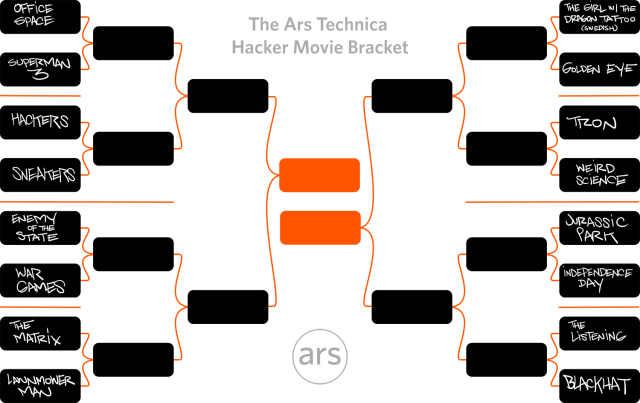
Ars Technica is doing college basketball style brackets for Hacker Movies.
Perhaps unsurprisingly, I am rooting for Sneakers to go all the way.

2) Haters Gonna Make Me Rich!
A common topic of discussion in our house, now that my wife works for UpWorthy is the idea that hate makes just as much money for content creators on the internet as "likes". Any time you share something to say to your friends "hey look how dumb this is" you are generating clicks and upranking links for the person you are disliking. Any time you link to a page, share it, like, or otherwise draw attention to it, you are just driving more traffic to that site and therefore more money into the pockets of the creator of the content you purport to dislike.
That's right: Trolling just makes the people you oppose have more visibility and more money! 
Of course, there are a few ways around that. One simple way is to just not share your hate, keep it to yourself. Another is to do a screen-cap of the content you so dislike and share it that way (just remind your fellow haters not to go post comments on the original blog entry, forum, or facebook post, since that's just driving traffic and giving them more money).
Another trick is to use services like doNOTlink. This site is a URL shortener (similar to bit.ly and many other), but it adds a nofollow attribute to the link, and also blocks search engine robots from crawling the link. Short version, it lets you share things without increasing their search ranking.
You could also add the nofollow attribute to your embedded links manually. If you are on WordPress (I very strongly recommend against using WordPress for anything), there is also nofollow a plugin to simplify doing this.

3) Samba Dropped the Beat...
If you've ever tried to make a Linux system talk to a Windows one, then you are probably familiar with Samba. If you haven't had to attempt this, then good for you. For those of you not so blessed, be warned that a serious vulnerability has been found in the Samba daemon (smbd) that can be exploited for arbitrary code execution. For once no blame can be placed on Microsoft, this is strictly a Samba problem.
A malicious Samba client can exploit the security hole by sending specially crafted packets to a vulnerable Samba server. This allows an unauthenticated attacker to execute arbitrary code with root privileges. 
The vulnerability has been addressed with the Samba 4.2.0rc5, 4.1.17, 4.0.25 and 3.6.25 security releases. Patches for older versions of the software have also been made available by Samba. Security updates have been released for Red Hat, Fedora, Ubuntu, Debian, and SUSE.
If you want to know more, Red Hat's  security team did a detailed analysis.

4) Why you should not piss off the internet...
Last time I mentioned the kerfuffle involving Lenovo pre-packaging an HTTPS bypassing adware on their laptops. Well, Lenovo has been subject to the standard recompense for being jerks to users in the internet age: their website was hacked.
The attack was carried out by the now infamous Lizard Squad, who are often not really on the side of the average consumer, but I have to give them props for this one. The attackers modified DNS records in Lenovo domain registrar accounts in an effort to redirect users to defacement pages. The hackers replaced the regular nameservers with CloudFlare IP addresses. Experts believe this was done in order to obfuscate the IP address of the destination server and to balance the traffic load to the website. CloudFlare acted quickly to restore services.
The attackers also changed mail server records allowing them to intercept messages sent to Lenovo email addresses. Lizard Squad has published screenshots of two intercepted emails on Twitter. The hackers said they might publish other “interesting” emails later.
The attack targeted at Lenovo shows that malicious actors don’t necessarily need to gain access to an organization’s corporate servers to cause damage. OpenDNS advises website owners to change their passwords frequently and, when possible, enable domain locking to avoid such redirections.


Friday, February 20, 2015

Justification for Your Paranoia

Thursday, February 26th is "Internet Slowdown Day" to demand Net Neutrality. It's also when the FCC is scheduled to vote. Hurry up and e-mail or call your legislators and tell them to support reclassifying broadband under Title II of the Communications Act.


A few more things of interest from my professional life...


1) Black Hats vs. Black Phones
In my very first post in this series, I mentioned the BlackPhone, in passing, as a thing that had a lot of promise. There is a lot to be said for designing phones with privacy and security in mind. Of course, such plans don't always pan out. The BlackPhone has gotten a lot of good press over the last year for its end-to-end encryption on all voice and text messaging, and has become a leader in the budding secure phone industry. Of course someone was going to find something wrong with that eventually...
In late January, a memory corruption vulnerability in the BlackPhone was discovered, or, more specifically, in Silent Circle Instant Message Protocol. SCIMP is used for sending text messages and files securely, but this vulnerability would cause the exact opposite. Using the flaw would allow an attacker to execute arbitrary code with the privileges of the messaging application. The flaw could be leveraged by a hacker to decrypt messages, take over Silent Circle accounts, access contacts, collect location information, and write data to external storage. An attacker could have also executed a privilege escalation exploit that would enable him to take complete control of the targeted handset.
The BlackPhone attack utilizes type confusion and could be triggered by sending targets a specially designed payload that allowed an attacker to overwrite a pointer in memory, paving the way to replacing normal contents with malicious ones. 
But don't go discounting the product yet. BlackPhone worked fast to fix the vulnerability, and the company announced a new bug bounty program to encourage researchers to find any other such problems. Despite the embarrassment this bug caused, if they can maintain such a quick turnaround on fixes, BlackPhone is still worth the $$.
 Or, if you cannot afford an actual BlackPhone, the SCIMP text app, Silent Text, is available for free on google play for your android. If you want to take it a step further, this tutorial shows how to remove or disable your android phone's excess sensors and use SnoopSnitch to reduce your chances of your communications being intercepted by third parties. SnoopSnitch will run on any rooted phone running Android 4.1 or higher, and constantly monitors communications on your phone to alert you to mobile network security issues, fake cellular base stations and more.
2) Want to hack a Gas Station?
In late January, HD Moore from Rapid7 disclosed that over 5800 Automated Tank Gauges at gas stations around the world were publicly accessible. Of those 5800, 5300 of them were in the US. In addition to the US, vulnerable ATGs were also discovered in Spain, Puerto Rico, Canada, Germany, Italy, New Zealand, Uruguay, France and Slovenia. Now 5300 is only a small fraction of the more than 115,000 refueling stations in the US.
Anyone connected to the internet can now view the in-tank inventories of the gas stations and manage the gas tanks. There are over 600 commands that can be executed, some of which include setting alarm thresholds, editing sensor configurations, running tank tests, or causing the tank to report as full or empty when it is not. Or, if you really wanted to cause some headaches, have the ATG report a leak which will shut down the tank and pump completely. 
To make things more fun Kyle Whilhoit at Trend Micro reports that more than 1500 devices used to monitor gas pumps were also vulnerable. These vulnerable devices have been actively exploited, including one pump that had its identifier changed from "DIESEL" to "WE_ARE_LEGION". 
Most of the things you can do after compromising either of these kind of devices are not really consumer-beneficial (read as 'you won't get free gas out of the deal'). If you were simply interested in a little mayhem though, you could cause all kinds of supply-chain problems--dispatching trucks to fill tanks that falsely report as empty, having tanks always report full so that they never get filled, etc.
3) Don't expect your car to be smarter than yourself...
So, you went and bought an expensive new car with all the fancy connected whistles: blue tooth, wi-fi, GPS navigation systems, the ability to start your engine with an app, or open your doors when you get close using NFC. Well, all those open communication ports just makes them easier targets. Don't really count on you being the only one able to open your doors or start your engine remotely.
report released by Sen. Ed Markey, a member of the Senate Commerce Committee, makes it clear that even the political establishment is catching on to how vulnerable internet connected machines are. The report included participation by just about every automaker except Aston Martin and Tesla. Of those reporting, nearly 100% of vehicles on the market have wireless communication capabilities and only two automakers had any capability to diagnose or meaningfully respond to an electronic intrusion. Close to two years ago white hats showed that you could control a vehicles breaking and acceleration remotely by taking over the vehicles controller area network (CAN), making the need for intrusion protection a serious safety concern.
The report also showed that vehicles from twelve manufacturers are collecting data about your driving habits and history, and 50% of those transmit that stored data back to the manufacturer, much of it without encryption, and without the driver's consent. 
Then, stacked on top of all of the previous research and the Senate report, around the same time that the report came out, a security researched showed how you can spoof the ConnectedDrive in BMW vehicles to not only intercept all the driving data that is being sent back to the manufacturer, but also unlock the car by simulating a fake phone network  (a wonderful new toy for anyone interested in committing some grand theft auto). BMW was quick enough to release a patch and push it out to the connected vehicles, but that patch basically boils down to just having the car use HTTPS...
Which we hope would be the first step in building such a system...not a patch released after the fact...
4) Your Lenovo was compromised when you got it...
Last week it was revealed that Lenovo computers come pre-installed with adware that hijacks encrypted web sessions and makes user vulnerable to HTTPS man-in-the-middle attacks. According to Lenovo this affects all consumer laptops shipped between October and December of last year (which may include some sitting on shelves in Best Buys or other retailers left over from Christmas inventories).
The software called "Superfish" installs a self-signed root HTTPS certificate than can intercept all encrypted traffic for every website you visit, no matter what browser you use, and inject advertisements into all of those . Even worse, the Superfish TLS certificate is the same for every Lenovo machine, which might allow attackers to create impostor HTTPS sites (like a bank for instance) with the same cert which your computer would then not flag as a forgery. Then, of course, all of those keys are protected by the same password,  "komodia".
Lenovo has published instructions for removing the malware, but you may be better off just doing a clean install of your OS.
The underlying SSL hijack software, Komodia Redirector and Komodia SSL Digester, developed by an Israeli company called Komodia (who's website is, understandably, DDOS'd), has been found on 14 pieces of software so far, including at least one trojan, and a privacy/security tool called PrivDog.
This website will test if your machine is infected with any of the Komodia-based apps. 
5) Some places are so insecure even a 7-year-old can hack them...
It is always good when you find a free Wi-Fi connection at a coffee shop. But all of this changed for all those present the day when a seven year old girl hacked one such WAP and accessed a stranger’s laptop within minutes.
An experiment was conducted by Hide My Ass!, a VPN provider, to alert the public about the risks involved when using free, public Wi-Fi. To prove how easy and vulnerable you may be, the team at HMA gave this task to a seven year old girl.
Primary school student Betsy Davies from Dulwich in South London was able to hack into a public Wi-Fi hotspot after she searched and watched a video tutorial online which explained how to hack a network. It took 7-year old Betsy just 10 minutes and 54 seconds to hack into a Wi-Fi hotspot. She then set up a Rogue Access Point which is often used by cybercriminals to trigger a ‘man in the middle’ attack allowing her to ‘sniff’ traffic.
Professional pen-tester Marcus Dempsey watched Betsy as she made her way through by Googling everything. Of the things she Googled, there were eleven million results returned and about fourteen thousand video tutorials linked via YouTube.
Cain McKenna Charley, a member of HMA, said that the image of cyber criminals hiding away in some far flung part of the world is antiquated. They are just as likely to be sitting next to you in a coffee shop or a public library. And if a child can perform a basic hack on a Wi-Fi network in minutes, imagine the damage a professional blackhat can do.
As for the title here, by "some places" I really mean "most places". Hacking is literally child's play and we need to make sure we teach our children the ethics to go along with their computer skills.

Thursday, February 12, 2015

Justification for Your Paranoia

There have been some weird events with my family lately, so it's been quite a while since I've done one of these. The past few weeks have been pretty fun for security: Anthem got hacked, TurboTax shutdown due to tax fraud, and Obama announced the creation of a new cyber security agency. I'm not going to talk about any of those things though, because the mainstream news has them covered. Here, instead, are some things a little farther afield.


1) A Skeleton Key
Network monitoring software or abnormal user behavior are two ways to detect an attacker within your network, but new malware dubbed "Skeleton Key" can evade both. The malware lets an attacker log in as any user, without needing to know or change the user's password, and doesn't raise any IDS alarms.
The new malware, discovered by Dell SecureWorks, can bypass Active Directory systems that only use single-factor authentication. Skeleton Key is deployed as an in-memory patch on a victim's AD domain controllers to allow the threat actor to authenticate as any user, while legitimate users can continue to authenticate as normal. So the attacker can pose as any user, without needing to steal the user's log-in credentials, and without changing the user's password, thereby soon alerting the helpdesk to a problem when the real user cannot log in.
The Skeleton key malware allows the adversary to trivially authenticate as any user using their injected password. This can happen remotely for Webmail or VPN. This activity looks like, and is, normal end user activity, so the chances of the threat actor raising any suspicion is extremely low and this is what makes this malware particularly stealthy. Another thing that makes Skeleton Key difficult to find is that it creates no network traffic, and is therefore not going to be detected by network-based monitoring systems.
Skeleton Key does have a few key weaknesses though. For one, before an attacker can deploy it, they must already have admin access to the network. Skeleton Key's other main drawback is that it does not use any persistence methods. So it must be redeployed any time the domain controller is restarted. However, deployment of Skeleton Key does trigger domain controller replication issues that researchers say eventually required a reboot to resolve. The lack of a persistence mechanism means that a reboot would effectively kick out the malware; but it could be redeployed later using remote access malware already installed within the organization.

2) Ghosts in the Shell
From skeletons to ghosts now (because undead are a great naming scheme). On January 28th, researchers at Qualys found a vulnerability in the gethostbyname() function of glibc (the GNU C Library) that allows a buffer overflow condition in which arbitrary code may be executed. This vulnerability is referred to by the name "GHOST".
To exploit this vulnerability, all an attacker needs to do is trigger a buffer overflow by using an invalid hostname argument to an application that performs a DNS resolution. This vulnerability then enables a remote attacker to execute arbitrary code with the permissions of the user running DNS. In short, once an attacker has exploited GHOST they may be capable of taking over the system. 
This hole exists in any Linux system that was built with glibc-2.2, but was actually patched in a minor bug fix released in 2013, but was never flagged as a security issues so many stable LTS releases never received the patch. Linux systems that are liable to attack include Debian 7, RHEL 5, 6, and 7, CentOS 6 and 7, and Ubuntu 10.04 and 12.04. Fixes have been released for Red HatUbuntu, CentOS, and Debian core.
After patching it, you should then reboot the system. Linux rarely needs to reboot, but since gethostbyname is called on by so many core processes, such as auditd, dbus-daem, dhclient, init, master, mysqld, rsyslogd, sshd, udevd, and xinetd, you want to make absolutely sure that all your system's running programs are using the patched code.
If that doesn't sound fun enough for you, according to Sucuri Researcher Marc-Alexandre Montpas, a version of the bug also probably affects PHP apps, including everything built on WordPress, since they also use gethostbyname().

3) Because everything needs to be smart, right?
In the last one of these I talked about cheap devices that can intercept and decrypt all of the keystrokes on your wireless keyboard. Well, now for a conceptual wireless keyboard that might actually help with your security, rather than hindering it.
In a publication for the American Chemical Society titled Personalized Keystroke Dynamics for Self-Powered Human–Machine Interfacing scientists describe a self-cleaning, self-powered smart keyboard that can identify computer users by the way they type, which they hope could help prevent unauthorized users from gaining direct access to computers.
Georgia Tech Professor Zhong Lin Wang and colleagues developed a "smart keyboard" that can sense typing patterns that can accurately distinguish one individual user from another. So even if someone knows your password, he or she cannot access your computer because that person types in a different way than you would. 
By analyzing such parameters as the force applied by key presses and the time interval between them the keyboard could provide a stronger layer of security for computer users. Every punch of the keys produces a complex electrical signal that can be recorded and analyzed. To evaluate the authentication potential of the keyboard, the research team asked 104 persons to type the word “touch” four times, and recorded the electrical patterns produced. Using signal analysis techniques, they were able to differentiate individual typing patterns with low error rates.
The self-powered device generates electricity when a user’s fingertips contact the multi-layer plastic materials that make up the device. In addition to providing a small electrical current for registering the key presses, the keyboard could also generate enough electricity to charge a small portable electronic device or power a transmitter to make the keyboard wireless. An effect known as contact electrification generates current when the user’s fingertips touch a plastic material on which a layer of electrode material has been coated. Using the triboelectric effect, a small charge can be produced whenever materials are brought into contact and then moved apart.
The new device is based on inexpensive materials that are widely used in the electronics industry. As part of the study, his research group evaluated the keyboard under challenging conditions, including application of moisture, dirt and oil. “You could pour coffee on the keyboard, and it would not be damaged,” said Wang. “Because it is based on a sheet of plastic, liquids will not hurt it.” AND the special surface coating repels dirt and grime!
But can it keep dog hair from getting stuck in the grooves between keys?.
4) A Possible Tor Replacement?
By this point, everyone paying any attention at all should know about Tor, onion routing, and the so-called deep web. If you didn't know about it a month ago, the recent trial of alleged Silk Road founder Ross Ulbricht, and the take-down of the Silk Road site should have pounded it home. Well for all you former Silk Road users looking for some libertarian economics on the net, there is a new Silk Road.
The fact that there is a new Silk Road (or even that there was an original Silk Road) does not interest me that much, what interests me is that it has been moved off of the Tor network and onto I2P. I2P (originally an acronym for "Invisible Internet Project") has been around since 2003, but was always overshadowed by Tor. 
Like Tor, I2P encapsulates and anonymizes communications over the Internet, passing Web requests and other communications through a series of proxies to conceal the location and identity of the user. Like Tor, I2P also allows for the configuration of websites called "eepsites," within the network that are concealed from the Internet at large (always with the .i2p extension) and are only reachable using the anonymizing network.
But there are some significant differences between Tor and I2P beneath the surface, from the technologies they are based on to how the networks are implemented. In many ways, I2P is a much less mature technology than Tor—but it has the potential to anonymize a greater range of applications and services as it gains adoption, and its architecture is theoretically less vulnerable to the sorts of deanonymizing attacks that have been used against Tor.
By contrast to Tor's "onion routing", I2P uses an approach jokingly called "garlic routing". The message is encrypted with a key for the end-point, and then each router along the path uses an encrypted "tunnel" to add a second layer of protection as it moves to the next—so there's always two layers of encryption on I2P traffic. And bundled in with the packaged "clove" of a message are additional encrypted handling messages: a "delivery status" message giving instructions on sending a message response to provide information on where the response of the message is to be sent and data with the sender's public key and other data needed to route back the response. Additionally, the router can bundle in other messages from other users into the same "garlic" for forwarding, making it more difficult to track an individual message in the stream.
I2P is essentially a peer-to-peer anonymizing service. All clients on the network also act as routers for I2P traffic, and there is no centralized directory server to help clients pre-build the routes for their connections. This is allows I2P to be a packet-switched network and load balance traffic across peers rather than having all the traffic from one client to an exit point follow a single path. It also allows I2P to use unidirectional tunnels—responses sent back to a request don't follow the same network path, making it more difficult to man-in-the-middle both parts of an I2P communication. The packet-based, one-way approach to connections also allows I2P to support UDP traffic—which means I2P can support a number of streaming applications. 
While this makes I2P useful for things like anonymized BitTorrent streams and the like, it does not have the scale or the level of additional protections that the Tor network provides. There are no tools to help get around state-imposed firewalls, for example, like Tor's pluggable transports and bridges. There's also not as much in the way of ready-made software and developer support for I2P as there is for Tor. But since I2P is based on Java, it is easily ported to new platforms. And as with Tor, there is a browser bundle available based on Firefox—called Abscond—for those who want a simpler way to hide themselves. (Unfortunately, it's only available for Windows.)
Of course, legally questionable marketplaces are not the only things hiding in anonymized networks. The newest version of the CryptoWall ransomware has started using I2P instead of Tor. Likewise, Popcorn Time (a BitTorrent media player) has started looking at supporting I2P anonymization.

5) Sometimes the conspiracy theories are right...
Back in July, The Official CIA Twitter account (yes the CIA uses twitter) tweeted:
"Remember reports of unusual activity in the skies in the '50s? That was us." 
The tweet, as well as a followup in December included links to a recently declassified (and as usual heavily redacted) 270 page document entitled The CIA and the U-2 Program, 1954-1974
The CIA has long been suspected of playing a part in one of the most elaborate hoaxes of the twentieth century; including Area 51 and the secrecy they shroud over it. At the least, the popular belief was a cover up from the public, when the government were well aware of the UFO sightings. But the policy was always one of strong denial at all cost.
“The technology that enabled U-2
pilots to operate extended periods
in reduced atmospheric pressure
would later play a major role
in the manned space program.”
In the foreword of the document released late last year, the CIA admitted the “struggle between the CIA and the US Air Force to control the U-2 and a-12 OXCART projects reveals how the manned reconnaissance program confronted problems...” in the broadest sense. But the blame is placed on the shoulders of the communist bloc at the time, cutting away at communications that were once easily accessible. The United States needed and warranted the high altitude capabilities of the U-2 aircraft; where the “Soviet radars would not be able to track aircraft flying above 65,000 feet.
Though unsuccessful, the predecessor of the U-2 was to be a “giant, almost flat-shaped airship with a blue-tinted, non-reflective coating, it would cruise at an altitude of 90,000 feet,” to demonstrate what capabilities the CIA were exploring for their aircraft at the time.
It is the section in Chapter two, entitled "U-2s, UFOs, and Operation Blue Book" that add credence to the CIA claims of responsibility. The interesting part is in the end section on page 85, where the document states that U-2 and later OXCART flights, “accounted for more than one-half of all UFO reports during the late 1950s and most of the 1960s.”
What does remain, which the document doesn’t seem to answer, is the other half of the UFO sightings that the CIA don’t take accountability for. Who is responsible for them?